AR Draw Anime: Sketch & Trace
- 4.3
- Rating
- 1.00M
- Installs
- Free
- Price
 Analysis by App-foxy
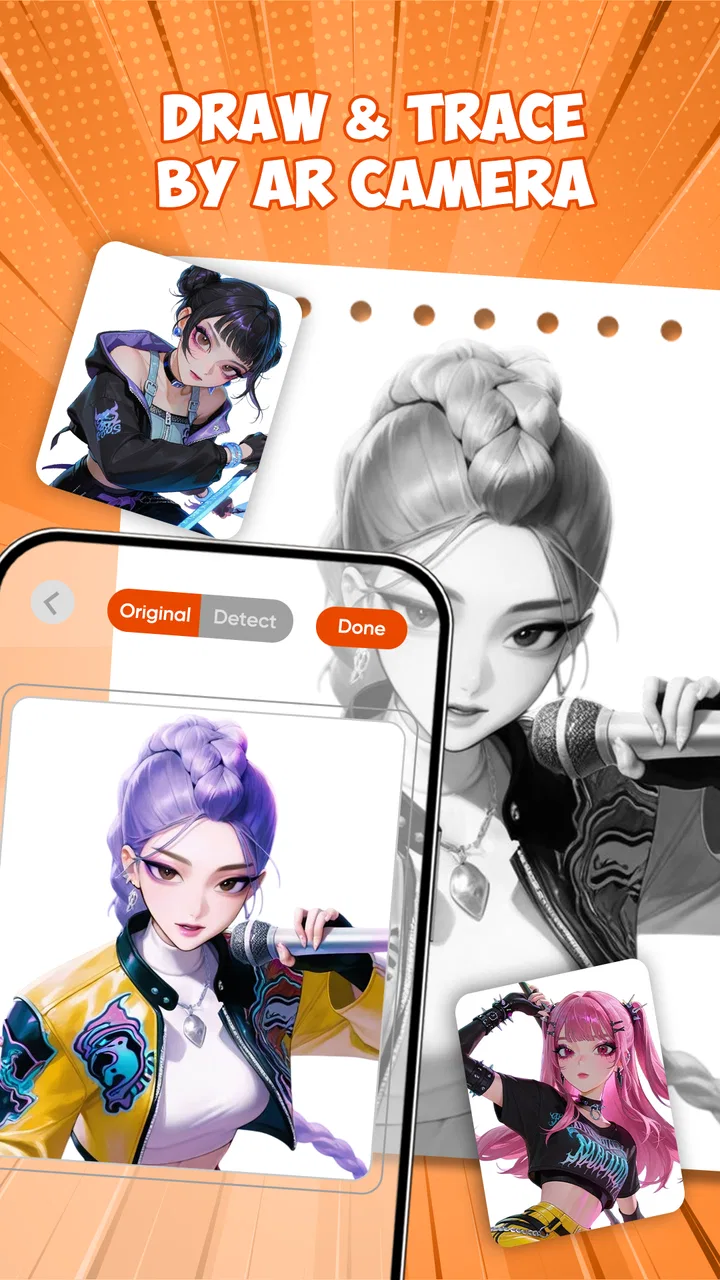
I tried AR Draw Anime: Sketch & Trace as a practical drawing companion rather than treating it like a full digital art studio. That distinction matters. The app is built around helping you place an image in front of you through augmented reality and then follow its lines on paper, with a large collection of templates aimed at anime and other subjects. In my experience, its appeal is immediate: it lowers the intimidating first step between seeing a character you like and making a physical sketch of it.
It is a free art and design app from BUGUN SOFTWARE COMPANY LIMITED, suitable for everyone and available on Android devices running version 7.0 or later. The current version is 1.3.8, and the app has already passed one million installs with an average score of 4.3 from around 3,300 ratings. Those figures suggest that it has found a clear audience, but they do not change the central question: is an AR tracing workflow actually useful for the way you want to draw?
How the current drawing experience feels
The basic idea is simple. You choose a template, use the camera view to position it over your drawing surface, and trace what you see. The phone becomes a visual guide rather than a drawing canvas. That makes the app especially approachable for beginners who can recognize shapes and lines but struggle to reproduce proportions from a blank page.
You May Also Like

 Blood Strike: 2.5 Anniversary
Blood Strike’s Loadouts Turn Every Drop Into a Tactical Gamble
A close look at Blood Strike’s custom loadouts: how fast access to signature weapons reshapes its battle royale rhythm, rewards preparation, and narrows the gap between fights.

 Pandora - Music & Podcasts
Pandora’s Music Is Easy to Start, but Harder to Recover
Pandora’s strength is its low-effort path from a seed to a station. Its weak spot is how much confidence it asks you to place in connection, setup, and quiet recovery.

 8 Ball Pool
 Is Built on Rivalries, Rematches, and Routine
A close look at the rivalries, rematches, shared routines, and unanswered safety questions that turn a quick pool match into a persistent mobile community.

 Samsung Music
’s Quiet Strength Is Playing What You Already Own
Its reach comes less from spectacle than from dependable access to a personal library. That simplicity is both the app’s strongest retention engine and its ceiling.

 AccuWeather: Weather Radar
AccuWeather Review: A Quick, Clear Forecast for Everyday Decisions
For everyday plans, the best forecast is the one you can understand quickly. AccuWeather makes rain timing, radar, and local conditions easy to act on, with a few trade-offs.

 Hill Climb Racing
Why Hill Climb Racing Still Turns Crashes Into One More Run
A tiny car, a bumpy hill and one more upgrade: Hill Climb Racing keeps resurfacing because its simple chaos makes every near-miss feel personal.
More From Our News Desk



I found the experience most convincing when the phone was held steadily and the paper was placed on a flat, uncluttered surface. Small changes in the phone’s position can affect alignment, so the setup is part of the drawing process. This is not a magic projection that permanently places an image on the page. You are still looking through the camera and manually controlling the pencil, which means patience and a reasonably stable setup make a noticeable difference.
The template library is the main reason to install it. The app presents more than 900 choices for sketching and tracing, with anime material among the obvious attractions but not the only possible subject area. That breadth is useful when you want a quick exercise instead of spending time searching for a reference image and preparing it yourself.
For a first attempt, I would choose a design with a clear outer silhouette and limited internal detail. A complicated face, layered hair, or heavily decorated costume can become frustrating when the reference shifts slightly. Starting with a simpler template lets you learn how to keep the camera, paper, and hand coordinated before moving to more demanding drawings.
A useful workflow for beginners
My preferred routine is to prepare the paper and pencil first, then open the camera-based drawing view. I lightly mark the intended boundaries of the sketch rather than immediately tracing every line. This gives me a way to check whether the template is positioned at a comfortable size. If the image is too large, my hand quickly runs out of room; if it is too small, details become difficult to follow.
I also recommend using a light touch during the first pass. Trace the major contours, pause, and check the overall proportions before adding eyes, clothing details, or decorative lines. The app is much more helpful as a guide for construction than as an excuse to copy every visible mark without thinking. Once the main shapes are in place, I can move the phone away and refine the drawing independently.
That approach reveals one of the app’s less obvious strengths: it can serve as a bridge between tracing and observation. At first, the overlay does most of the teaching. After a few attempts, I began paying more attention to how the head, shoulders, and facial features relate to one another. The result is still based on a guide, but the process can gradually improve visual confidence.
Where anime templates work best
Anime drawings are a natural match because many designs depend on recognizable outlines, expressive eyes, hair shapes, and strong costume silhouettes. A beginner can focus on line control without first having to invent a pose. The phone’s view is also useful for testing the scale of a character on a page before committing to a final outline.
There is a trade-off, though. Tracing a polished character can make the finished result look better than the underlying drawing skills actually are. If your goal is to learn anatomy, perspective, or original character design, I would use the templates as warm-up material rather than treating them as the whole course. After tracing one image, try redrawing the same pose from memory or alter the hairstyle and clothing. That extra step turns a copying exercise into a more active lesson.
The app is less compelling for someone who already works comfortably from references or who wants precise digital editing. A paper sketch guided by a phone cannot replace layers, brush engines, selection tools, or detailed correction controls found in a dedicated illustration app. Its value is in making the first physical drawing easier, not in managing a finished digital artwork.
What the current version means for users
Version 1.3.8 is the current release, and the app’s recent availability means users are encountering a relatively young product rather than a long-established drawing suite. I see that as both an opportunity and a reason to keep expectations realistic. The core concept is already easy to understand, but the long-term quality of the experience will depend on how consistently the template collection, camera workflow, and usability are refined.
For someone installing it today, the practical benefit is that the app has a clear purpose and a substantial starting library. You do not need to build a reference collection before trying the method. The free price also makes experimentation straightforward: if AR tracing does not suit your habits, the cost barrier is low.
Existing users may notice the importance of maintaining a repeatable setup more than any single version label. A stable phone position, even lighting, and a clean drawing surface have a bigger effect on the result than simply switching between templates. I would treat every update as a reason to check the drawing flow again, but I would not assume that a newer version automatically turns the app into a professional tool.
The developer, BUGUN SOFTWARE COMPANY LIMITED, has chosen a focused concept instead of trying to combine every possible art feature. That focus is helpful for a child, casual hobbyist, or beginner who wants a guided activity. It also explains why experienced artists may find the app narrow. The product is strongest when its simplicity is an advantage.
Everyday situations where it earns a place
Imagine having a quiet afternoon and wanting to draw an anime character on paper, but not knowing how to begin. With this app, you can select a template, place a sheet on the table, and work through the outline in manageable stages. It is a more active pastime than scrolling through references, while still providing enough structure to prevent the blank page from taking over.
It can also work well for a parent or older sibling helping a child explore drawing. The Everyone age rating fits that accessible positioning, and the template-led approach gives the activity a clear starting point. I would still encourage an adult to help with the physical setup, especially if the child keeps moving the phone while trying to trace. The best results come from treating the device as a steady visual aid rather than something to hold loosely in one hand.
Another useful scenario is making a quick handmade card or decoration. You can use the guide to establish a character or object, then add your own colors, background, speech bubble, or lettering after the tracing stage. The app does not need to produce the entire finished piece to be valuable; it can simply solve the difficult outline problem.
For practice sessions, I would create a progression. Start with a simple template, repeat it at a different size, then choose a more detailed design. This exposes a real trade-off: larger images are easier for learning line placement, while smaller images may be more convenient when you are fitting several sketches onto one page. Changing scale is not just a cosmetic choice; it affects how much control you have over details.
Important friction before you rely on it
The camera-based method is sensitive to movement. If the phone shifts, the guide and the paper no longer agree, and the drawing can develop doubled lines or uneven proportions. I would not use it when I need a fast result, when the table is crowded, or when I cannot keep the device in a stable position. A traditional printed reference may be less exciting, but it is often more dependable for a long session.
Lighting and surface contrast also matter in practical use. A dark or visually busy background can make it harder to separate the paper from the surrounding area. A plain surface and clear sheet of paper make the overlay easier to follow. This is a small preparation step, but it saves more frustration than repeatedly blaming the template for a difficult trace.
There is also a concentration cost. Looking between the screen and the pencil can feel less natural than drawing from a printed picture beside the page. Some people will enjoy the augmented-reality effect; others will find it distracting. If you are practicing confident freehand lines, relying on the screen for every movement may encourage hesitation. I would alternate between guided tracing and independent redraws.
The app’s free access is attractive, but free does not mean it will suit every workflow. Someone searching for advanced editing, export controls, layered compositions, or a complete digital painting environment should look toward a conventional art application instead. Someone who wants a structured drawing lesson with explanations of anatomy and perspective may also get more from an educational course. This app gives you visual placement, not a full curriculum.
How it compares with familiar alternatives
Compared with drawing from a book or a printed reference, AR Draw Anime: Sketch & Trace is more flexible about scale and immediate selection. You can work from a phone without printing a reference, and the overlay can make proportions easier for a beginner to judge. The disadvantage is that the phone must remain part of the physical setup, while a printed page stays still and does not compete for attention.
Compared with a digital drawing app, it offers a very different kind of satisfaction. Digital tools are better for undoing mistakes, experimenting with color, and building a polished image in layers. This app is better when your goal is a pencil-on-paper result and you want help establishing the first lines. Choosing between them depends less on which is more advanced and more on whether you want a physical sketch or a digital workflow.
Compared with simply searching for images online, the built-in library is convenient because it turns browsing into an immediate drawing task. You are not constantly downloading, resizing, or trying to position an unrelated reference. At the same time, a general image search gives you far more variety and lets you study real photographs, unusual poses, and specific subjects that may not match the app’s template style.
My practical recommendation is to use this app as a starting tool and keep another method nearby. A printed reference is useful when the phone will not stay stable. A digital editor is useful after the sketch is complete. The app does not need to replace those alternatives; it fills the narrow but valuable gap between “I want to draw this” and “I have no idea how to place the first line.”
Who should install it, and who should skip it
I would recommend it to beginners, anime fans, casual paper artists, parents looking for a guided creative activity, and anyone curious about drawing through an augmented-reality overlay. It is especially suitable if you prefer a quick template-driven session over learning a complex interface. The free price makes it easy to test without committing to a paid art package.
I would be more cautious if you already draw confidently from observation. You may find the guided placement restrictive, particularly if you want to change poses, redesign characters, or develop a personal style. Professional illustrators and serious digital artists should also view it as a supplementary sketch aid, not as their main production environment.
It is not the right choice when stability, speed, or complete control matters more than approachability. A printed reference wins for reliable long sessions. A full digital art app wins for editing and finishing. A drawing course wins for systematic instruction. The best reason to use this app is that it makes starting feel less intimidating.
What I would watch as the product develops
Because the current version is 1.3.8 and the app is still a relatively recent arrival, I would watch how the experience evolves rather than judging it only by the novelty of AR tracing. The most meaningful improvements would be the ones that reduce setup friction, make positioning easier, and help users move from tracing toward independent drawing. A bigger library is welcome, but usability would matter more to me than simply adding more choices.
I would also pay attention to how well the app serves both anime beginners and people who want subjects beyond characters. Variety is useful only when templates remain practical to trace. A collection that mixes simple outlines with progressively challenging designs would support learning better than a large group of equally complex images.
For now, my advice is to install it with a clear expectation: this is a guided sketching tool, not a replacement for a complete art studio. Set up the phone carefully, begin with a simple template, trace the large forms before the small details, and redraw the result without the overlay when you can. That workflow gives the app a real educational role instead of reducing it to a one-time novelty.
After using it that way, I see AR Draw Anime: Sketch & Trace as a friendly entry point into paper drawing. It combines an accessible template library with a visual guide that can turn hesitation into action. Its limitations are equally clear, especially the dependence on a steady camera setup and the lack of the deeper control expected from professional art software. Still, for a free, Everyone-rated app focused on helping people begin, it is a worthwhile recommendation to a friend who wants to draw anime but needs a little help getting started.
FAQs for AR Draw Anime: Sketch & Trace
01What is AR Draw Anime: Sketch & Trace and how does it work?
AR Draw Anime: Sketch & Trace is an innovative app that leverages augmented reality to help users learn how to draw anime characters. By overlaying a virtual sketch on your real-world environment, it guides users through the drawing process, making it easier to trace and learn proportions, shapes, and details. This interactive experience can be particularly helpful for beginners and aspiring artists.
02Is AR Draw Anime suitable for complete beginners in drawing?
Yes, AR Draw Anime is designed with beginners in mind. The app provides step-by-step guidance through AR technology, making it easy to follow along and replicate anime character sketches. Users can start with simple lines and gradually build up to more complex designs, improving their drawing skills progressively.
03What devices are compatible with AR Draw Anime?
AR Draw Anime is available for both Android and iOS devices. However, since it uses augmented reality, it's essential to have a device that supports AR capabilities. Most modern smartphones and tablets should be compatible, but it's always a good idea to check the specific device requirements in the app store before downloading.
04Are there any in-app purchases or subscription fees involved?
While AR Draw Anime offers a variety of free features, it may also include in-app purchases for additional content, such as advanced tutorials, premium anime sketches, or ad-free experiences. It's advisable to review the app's pricing details in the app store to understand what optional purchases are available.
05Can I use AR Draw Anime offline, or does it require an internet connection?
AR Draw Anime primarily functions offline once downloaded, as it utilizes the device's camera and pre-downloaded content for AR experiences. However, an internet connection might be required for certain features like downloading new content, updates, or accessing online support. Ensure you download any necessary materials before going offline.
Pros
- Easy to use interface for beginners.
- Wide variety of anime templates.
- Offline mode available for sketching.
- Customizable pen and brush settings.
- Includes step-by-step tutorials.
Cons
- Limited free templates without subscription.
- Ads can be intrusive during use.
- Some features require in-app purchases.
- No social sharing directly from app.
- Occasional bugs with newer devices.

AR Draw Anime: Sketch & Trace
Gallery